 Monster Cone
pip 虽然提供了 PaddleOCR 安装包。但在打包使用 PaddleOCR 的程序时,最终生成的程序会因为依赖过多等导致程序体积过大,并且不方便移植,因此通过 DLL 的方式调用 ocr,可以减少程序最终大小。还可以方便其他语言调用 ocr。
使用 Cmake 打开 PaddleOCR 项目
首先我们根据Visual Studio 2019 Community CMake 编译指南这个教程,让我们来到使用 Visual Studio 打开项目这一步。
开始编译 DLL
1. 修改 OCR 配置
我们先打开源文件的 args.cpp 文件,分别修改 det_model_dir、rec_model_dir、rec_char_dict_path 这三项的值
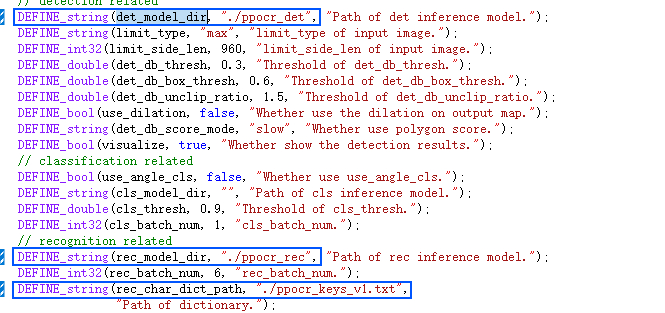
- det_model 和 rec_model 就是PaddleOCR的检测模型和识别模型。(路径是目录不是文件)
- ppocr_keys_v1.txt 是 PaddleOCR 的字典文件
2. 封装 DLL
我们在 PaddleOCR 的项目中创建一个 ppocr.h 头文件。代码如下
#pragma once
// ppocr.h
#pragma once

#ifdef MONSTER_OCR_EXPORTS
#define MONSTER_OCR_API __declspec(dllexport)
#else
#define MONSTER_OCR_API __declspec(dllimport)
#endif

extern "C" MONSTER_OCR_API const char* ocr(const char* img_path);
它将暴露一个 ocr 方法供其他语言调用,接收一个图片路径字符串作为参数,并返回一个识别的字符串。
接下来修改 main.cpp 实现这个 ocr 方法。先将原 main.cpp 内容注释掉,再添加下面的代码。
#include "opencv2/core.hpp"
#include "opencv2/imgcodecs.hpp"
#include "opencv2/imgproc.hpp"
#include <iostream>
#include <vector>
#include <string>

#include <include/args.h>
#include <include/paddleocr.h>
#include <include/paddlestructure.h>
#include "ppocr.h"

using namespace PaddleOCR;

const char* ocr(const char* img_path) {
    PPOCR ocr;

    cv::Mat img = cv::imread(img_path, cv::IMREAD_COLOR);
    if (!img.data) {
        std::cerr << "[ERROR] image read failed! image path: " << img_path << std::endl;
        return "";
    }

    std::vector<std::vector<OCRPredictResult>> ocr_results = ocr.ocr(std::vector<cv::Mat>\{img\}, false, FLAGS_rec, FLAGS_cls);
    std::string result = ocr_results[0][0].text;

    char* res = (char*)malloc(result.size() + 1);
    strcpy(res, result.c_str());
    return res;
}- 首先导入 paddleocr 等其他用到的库。
- 定义一个 ocr 方法,方法名、返回类型和参数类型都需与 ppocr.h 中的定义一样才能重载 ocr 方法。
- 因为 ocr.ocr 不接受单张图片,所以使用 std::vector<cv::Mat>{img}传递单张图片,最终的结果也是数组类型。
- 我的需求只需要 rec 识别,因此我使用了 false 替换了 FLAGS_rec,FLAGS_rec 默认为 true。
- ocr_results 结果是二维数组,表示每张图每个识别区域的识别信息。我的识别都是单行文本,因此使用 ocr_results[0][0].text 就可以获取到我想要的识别文本。单个识别结果还有 boxes、score、cls_label、cls_score 信息。
- text 是一个 std::string 字符串,我们的返回参数是 char*类型,需要进行转换再返回结果。
如果无法导入 ppocr.h,需要在项目属性配置中的 C/C++ 常规配置中添加 ppocr.h 的目录到附加包含目录中。
至此,修改部分就结束了,我们生成解决方案就可以得到 ppocr.dll 文件了。
此时 ppocr.dll 还缺少依赖文件,它们分别是
paddle_inference/paddle/lib/paddle_inference.dll paddle_inference/third_party/install/onnxruntime/lib/onnxruntime.dll paddle_inference/third_party/install/paddle2onnx/lib/paddle2onnx.dll opencv/build/x64/vc15/bin/opencv_world455.dll
我们将其复制到 ppocr.dll 同目录中即可。
3. Python 通过 dll 识别文字
我们在同目录下创建 dll_demo.py 文件
import ctypes
from ctypes import c_char_p

# 加载DLL文件
dll = ctypes.CDLL("./ppocr.dll")
dll.ocr.restype = c_char_p


def ocr_image(img_path):
    # 将图像路径编码为字节串
    img_path_bytes = img_path.encode("utf-8")
    # 调用DLL方法
    result_bytes = dll.ocr(c_char_p(img_path_bytes))
    # 将字节串解码为字符串
    result = result_bytes.decode("utf-8")
    return result


if __name__ == "__main__":
    img_path = "./1.jpg"
    result = ocr_image(img_path)
    print(result)
因为 ctypes 对 C#风格的接口比较友好,因此 ocr 的封装都是使用 char*类型,因此在 python 中调用时,对传参和结果都要进行转义才能得到正确的结果。
我使用的 1.jpg 图片是 ,最终 result 会打印 4,836。
上述已经封装好的 dll 可以在https://github.com/Monster-2019/ppocr_dll/releases/tag/1.0下载使用。
最后,虽然 PaddleOCR 对中文的支持非常友好,但即使使用 DLL 体积好是编译版本的 tesseract 的数倍。如果不满足你的需求,可以按照上面的思路封装你自己的方法。